
Your AI Outside Counsel,
Inside Your Pocket
Legal AI wherever you go. Access Co-Counsel and your personalized Firm IQ from your iPhone or iPad.
Download on App Store- Full Firm IQ integration
- Co-Counsel on the go
- Offline document access
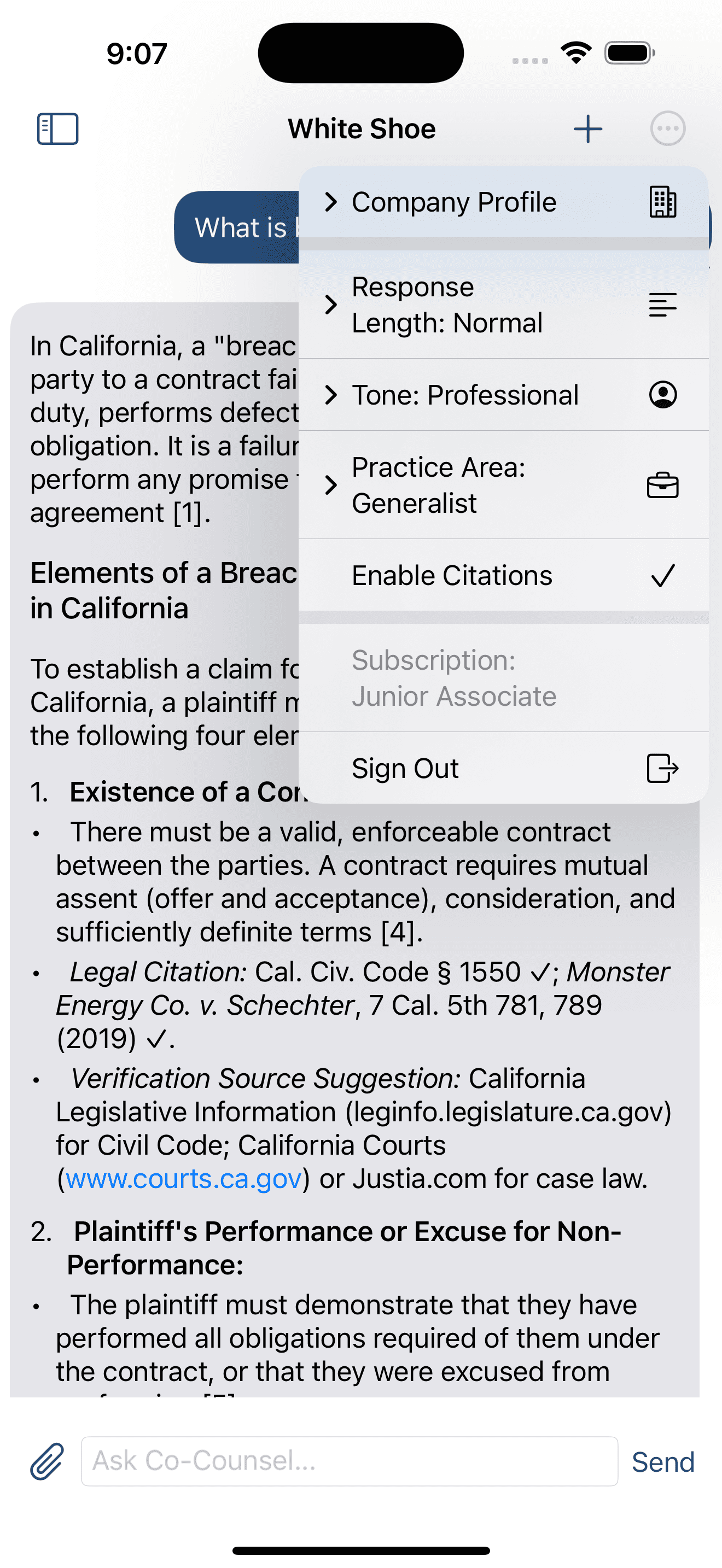
Your Legal Assistant, Always Within Reach
Perfect for reviewing documents on the go, getting quick legal insights between meetings, or conducting research from the courthouse. White Shoe iOS brings the full power of your AI legal team to your iPhone and iPad.
Full Firm IQ Integration
All your playbooks, company profiles, and preferences synced automatically
Co-Counsel On the Go
Chat with AI legal assistant anytime, anywhere
Seamless Sync Across Devices
Start on desktop, continue on mobile—everything stays in sync
Offline Document Access
Review saved documents even without internet connection
Everything You Need for Mobile Legal Work
The iOS app delivers the full White Shoe experience, optimized for mobile workflows and on-the-go productivity.
Co-Counsel Chat
Get instant answers to legal questions, research support, and strategic guidance—all from your mobile device.
Document Review
Upload and review contracts, agreements, and legal documents with AI-powered analysis right from your phone.
Playbook Access
Reference your negotiation playbooks, company policies, and style guides wherever you are.
Real-Time Sync
All your conversations, documents, and settings sync instantly across your iPhone, iPad, and desktop.
Offline Mode
Download documents for offline access and review them without an internet connection—perfect for flights and court visits.
Smart Notifications
Get notified about important updates, document reviews, and time-sensitive legal matters on the go.
Built for Legal Professionals on the Move
Real scenarios where the White Shoe iOS app makes a difference
Between Meetings
A client calls with an urgent question about a contract clause. Pull up the document on your iPhone, ask Co-Counsel for guidance, and provide an informed answer—all before your next meeting starts.
At the Courthouse
Waiting for your case to be called? Use White Shoe to review case precedents, prepare arguments, or research opposing counsel's recent cases—all from your iPad.
During Commute
Turn your commute into productive time. Review overnight emails, analyze contract changes, or prepare for the day's negotiations using your company's playbooks.
Business Travel
Flying to a client meeting? Download key documents for offline review, prepare talking points using Co-Counsel, and arrive fully prepared—even after a long flight without WiFi.
After Hours Review
Urgent deal closing tonight? Review final documents from home on your iPad, suggest redlines using your playbooks, and keep the deal moving—all without opening your laptop.
Client Site Visits
At a client's office when questions arise? Access your Firm IQ, reference similar deals, and provide informed guidance on the spot—building trust and demonstrating expertise.
Get Started in Minutes
Download, sign in, and take White Shoe with you everywhere
Download from App Store
Search for "White Shoe AI" in the App Store or tap the download button below. The app is free for all White Shoe subscribers.
Download on App StoreSign In with Your Account
Use your existing White Shoe credentials to sign in. All your Firm IQ data, playbooks, and conversation history will sync automatically.
Enable Notifications (Optional)
Stay updated on important matters, document reviews, and time-sensitive tasks by enabling push notifications.
Start Working Anywhere
That's it! You now have access to your full AI legal team from anywhere. Start a Co-Counsel chat, review a document, or reference your playbooks on the go.
Bank-Level Security on Mobile
Your sensitive legal data is protected with the same enterprise-grade security as the web platform
End-to-End Encryption
All data transmitted between the app and our servers is encrypted using industry-standard protocols.
Biometric Authentication
Secure your app with Face ID or Touch ID for an extra layer of protection.
Secure Offline Storage
Downloaded documents are encrypted on your device using iOS security features.
Remote Wipe
Lost your device? Administrators can remotely wipe app data to protect confidential information.
SOC 2 Type II Compliant
Our mobile app follows the same security standards as our web platform.
Regular Security Updates
Automatic updates ensure you always have the latest security patches and improvements.
System Requirements
Compatible Devices:
- iPhone running iOS 15.0 or later
- iPad running iPadOS 15.0 or later
- Optimized for iPhone 12 and newer
- Supports both portrait and landscape modes
You'll Need:
- Active White Shoe subscription (Junior Associate or higher)
- Internet connection for real-time features
- Approximately 150MB of storage space
- Optional: Face ID or Touch ID for biometric security
Frequently Asked Questions
Is the iOS app free?
Yes! The iOS app is included with your White Shoe subscription at no additional cost. You need a Junior Associate or higher plan to access the app. View pricing →
Will my data sync with the web version?
Absolutely! Everything syncs in real-time between the iOS app and the web platform, including conversations, documents, playbooks, and preferences. Start a task on your desktop and finish it on your iPhone seamlessly.
Can I use the app offline?
Yes, with limitations. You can download documents for offline viewing and access previously loaded content. However, Co-Counsel chat and AI analysis features require an internet connection. Your offline work will sync once you're back online.
Is there an Android version?
Not yet, but we're actively developing an Android app and expect to launch it in the near future. Join our newsletter to be notified when it becomes available.
How much storage does the app use?
The app itself is approximately 150MB. Additional storage will be used if you download documents for offline access. You can manage downloaded content in the app settings to free up space when needed.
Can multiple team members use the app?
Yes! Every team member with a Junior Associate or higher subscription can download and use the iOS app. Each user has their own login and sees data appropriate to their permissions and role.
What happens if I lose my phone?
Your data is safe. All information is encrypted on the device, and you can sign in from a new device to access everything. Additionally, enterprise administrators can remotely wipe app data from lost devices for added security.
Does the app drain my battery?
White Shoe is optimized for battery efficiency. The app uses background refresh sparingly and only processes data when you're actively using it. Most users report minimal impact on battery life during normal use.
Take White Shoe Everywhere You Go
Download the iOS app today and never miss a beat in your legal work
Questions? Contact our team or visit our help center