
Requires Junior Associate or higher subscription
Microsoft Word Plugin: White Shoe Meets Word
Review and redline contracts with AI-powered precision without ever leaving your document. White Shoe integrates directly into Microsoft Word, bringing your playbooks, Firm IQ, and Co-Counsel right where you need them.
Transform your drafting workflow with intelligent real-time analysis. Get instant risk assessments, playbook-driven redlines, and compliance checks as you work—empowering your lean team to review contracts with the speed and precision of a full legal department.
Your AI Associates in Word
Transform your drafting workflow with intelligent integration. Access your White Shoe playbooks, Firm IQ, and specialized knowledge without ever leaving the document, empowering your lean team to review contracts with the speed and precision of a full legal department.
Seamless Integration in Four Steps
Deploy enterprise-grade capabilities in minutes.
Instant Installation
Download the plugin from the Microsoft Office Store by selecting "Add-ins" from the Home Tab in Word, then search "White Shoe". You will be up and running in under 60 seconds.
Immediate Activation
Open any contract in Word and launch the White Shoe plugin from the toolbar. Login with your White Shoe credentials (requires Junior Associate plan or higher).
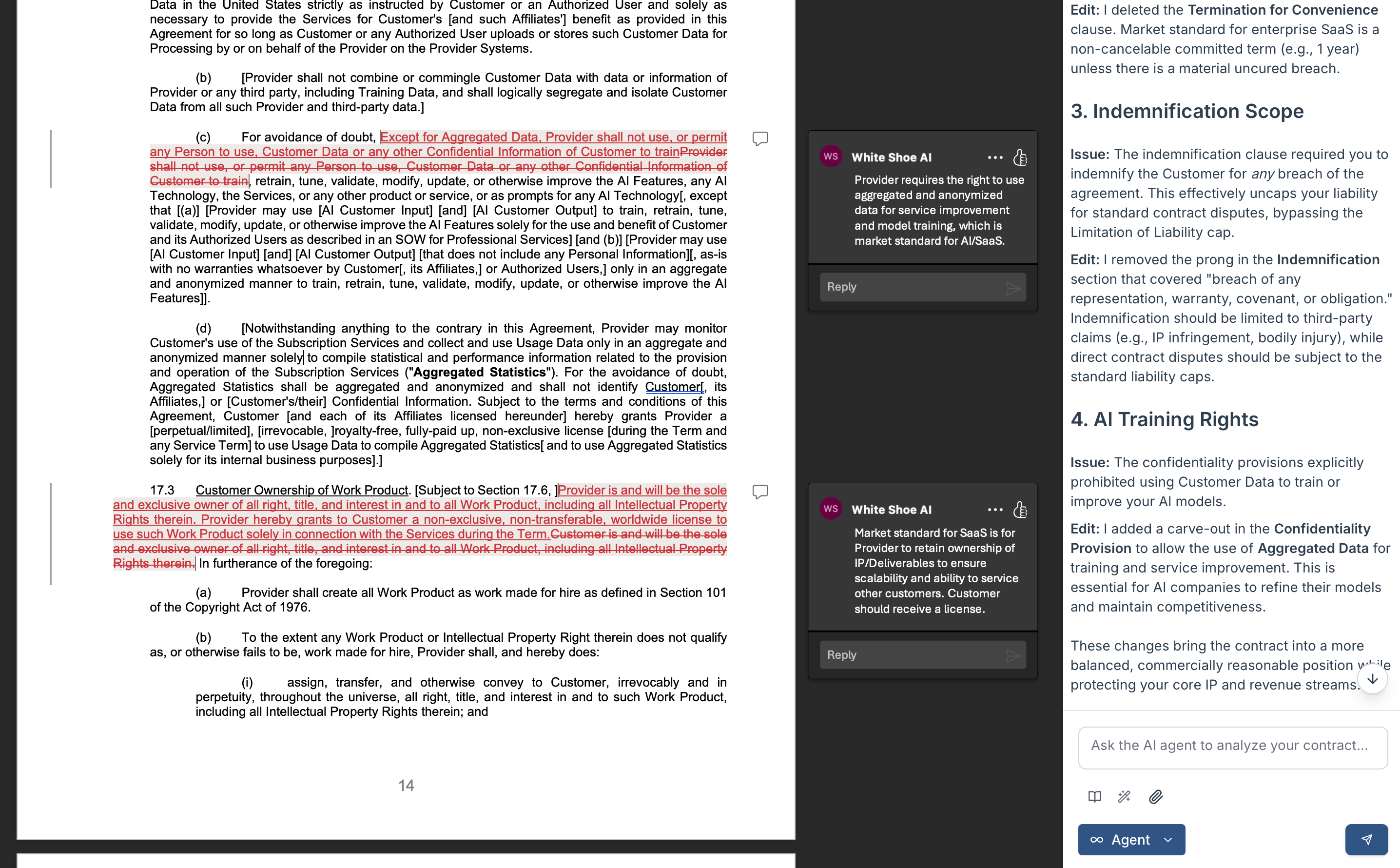
Intelligent Analysis
Receive immediate, context-aware analysis. The AI evaluates your document against your playbooks, market standards, your Firm IQ, and attached documents.
One-Click Redlining
Accept, modify, or reject AI suggestions with a single click. All edits utilize Word's native Track Changes for easy collaboration.
Powerful Features for Modern Legal Teams
Contextual Contract Intelligence
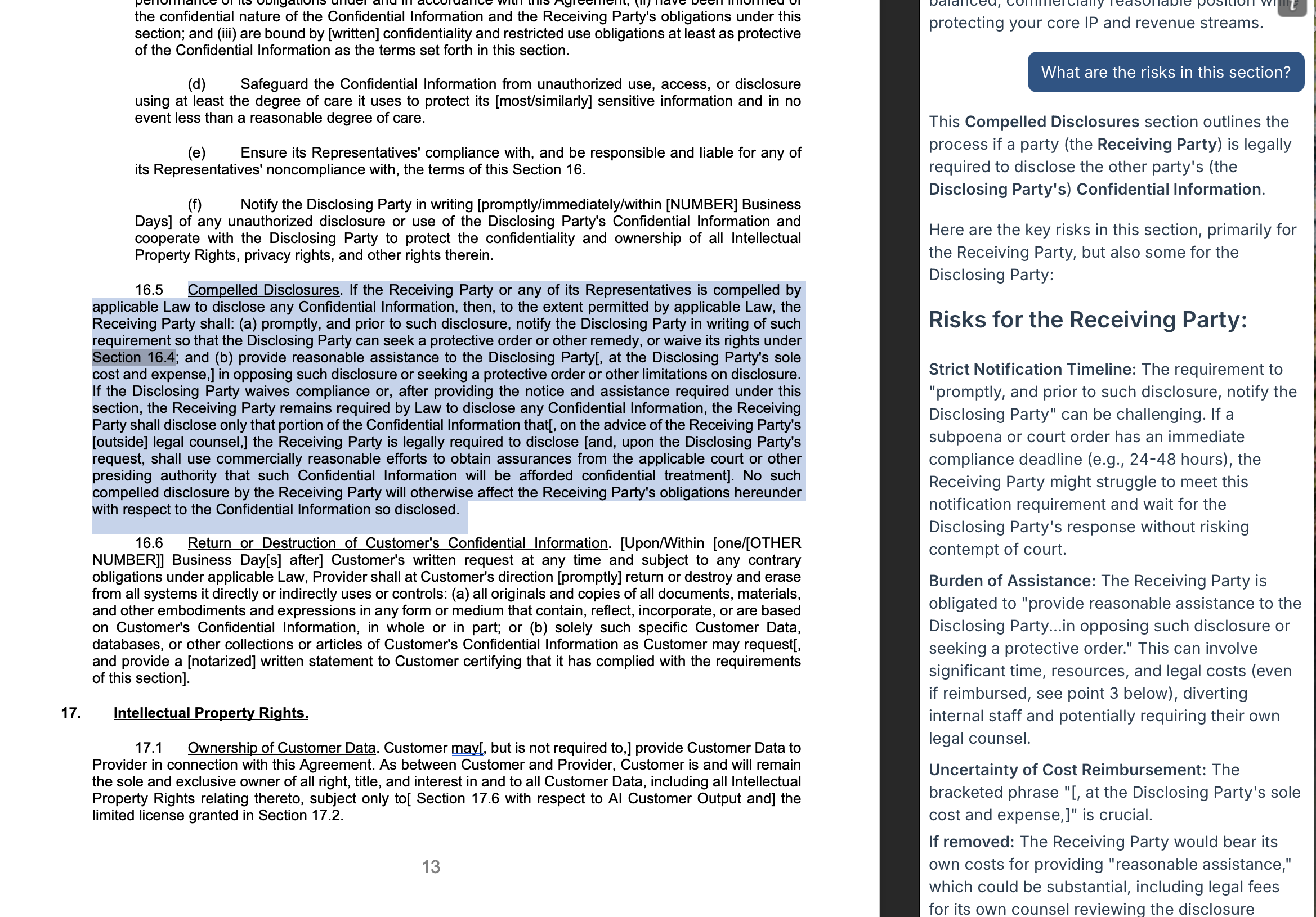
Select any clause, paragraph, or term in your contract to get instant legal analysis. White Shoe understands context—whether you're reviewing an NDA, employment agreement, or M&A transaction document—and provides relevant insights based on your practice area.
- Instant clause-level risk assessment
- Market standard comparisons
- Alternative language suggestions
Playbook-Powered Redlines
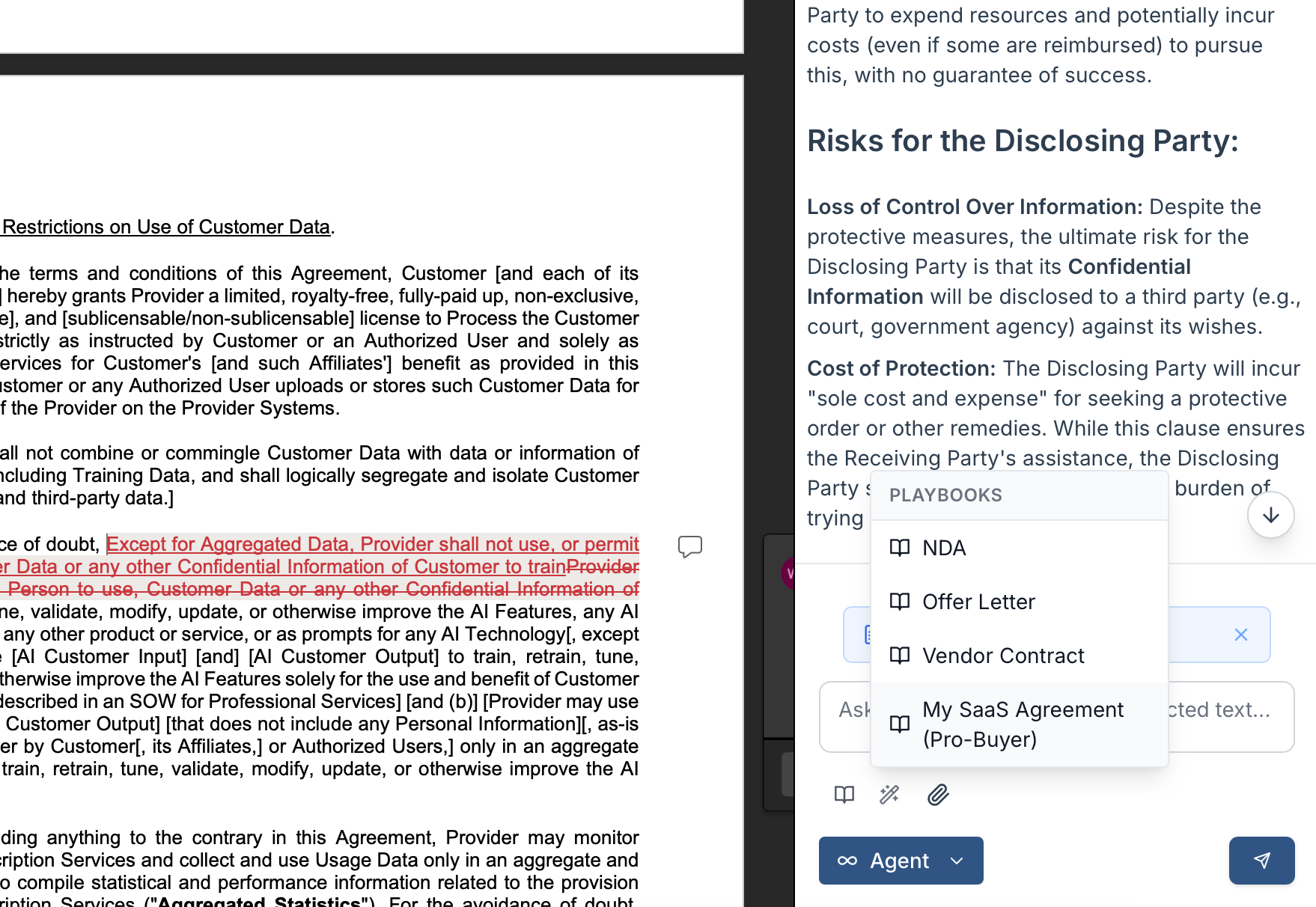
Your playbooks come to life in Word. Build them once in the main platform with our Playbook Manager associate—from scratch, from templates, from existing Word/PDF/Excel playbooks, or extrapolated from your uploaded precedents. Then watch them work automatically in every contract review.
- Intelligent redlines generated from your negotiation strategies
- Tiered suggestions: must-have, nice-to-have, and stretch positions
- Clear explanations for every suggested change
Powered by Your Firm IQ
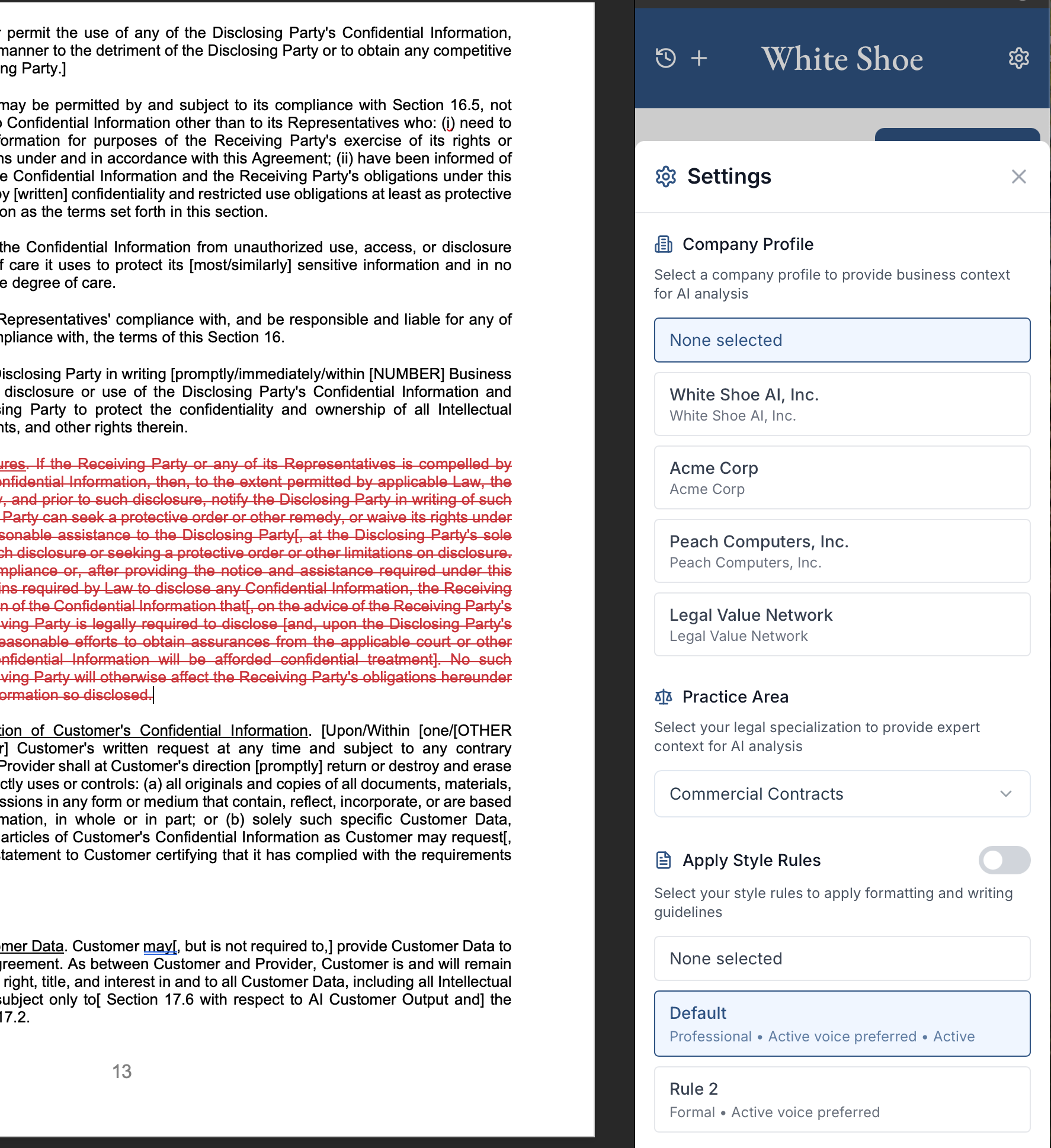
The Word Plugin leverages your entire Firm IQ—the institutional knowledge you've built in White Shoe. Every contract review is informed by your Company Profiles, Style Rules, and Knowledge Base, ensuring consistent, on-brand analysis across every document.
- Company Profiles define your specific terms and requirements
- Style Rules enforce consistent language and formatting
- Knowledge Base provides context from past deals and precedents
Built for Every Contract Type
Whether you're in-house counsel, outside counsel, or a legal ops professional
...and many more
Enterprise-Grade Security
Your contracts never leave your control
End-to-End Encryption
All data transmitted between Word and White Shoe is encrypted in transit and at rest.
No Document Storage
Documents remain in your Microsoft environment. We never store your contracts on our servers.
SOC 2 Type II Compliant
White Shoe maintains SOC 2 Type II certification for security and availability.
Role-Based Access
Control which team members can access specific playbooks and company profiles.
Audit Logs
Complete visibility into who accessed what documents and when for compliance purposes.
GDPR & CCPA Ready
Fully compliant with global privacy regulations and data protection standards.
System Requirements
Compatible With:
- Microsoft Word for Windows (Office 365, Office 2019 or later)
- Microsoft Word for Mac (Office 365, Office 2019 or later)
- Word Online (browser-based)
- Microsoft 365 Business and Enterprise subscriptions
You'll Need:
- Active White Shoe subscription (Junior Associate or higher)
- Internet connection for AI analysis
- Permission to install Office add-ins (check with IT if corporate device)


Frequently Asked Questions
Do I need to upgrade my subscription?
The Word Plugin is included with Junior Associate, Senior Associate, Partner, and Enterprise plans. If you're currently on a Paralegal or Summer Associate plan, you'll need to upgrade to access this feature. View pricing →
Will this work with my existing playbooks?
Yes! The Word Plugin automatically syncs with all your existing playbooks, company profiles, style rules, and practice area preferences from your White Shoe account. Any changes you make in the platform are instantly reflected in Word.
Can I use this offline?
The Word Plugin requires an internet connection to perform AI analysis and access your playbooks. However, you can continue working in Word offline—the plugin will queue your requests and process them once you're back online.
How does this integrate with Track Changes?
All AI-suggested edits are inserted using Word's native Track Changes feature. This means you can accept, reject, or modify suggestions just like you would with any other reviewer's changes. Comments from White Shoe also appear in the standard Word comments sidebar.
Is my IT department required to approve this?
Many organizations require IT approval before installing Office add-ins. We provide documentation and security assessments to help your IT team evaluate and approve the White Shoe Word Plugin. Contact our support team for assistance with enterprise deployment.
What languages are supported?
At launch, the Word Plugin will support English-language contracts. We're actively developing support for additional languages and will announce new language capabilities as they become available.
Can my entire team use this?
Absolutely! Every team member with a Junior Associate or higher subscription can install and use the Word Plugin. Team playbooks and company profiles are shared across your organization, ensuring consistency in everyone's contract reviews.